> ## Documentation Index
> Fetch the complete documentation index at: https://docs.revize.app/llms.txt
> Use this file to discover all available pages before exploring further.
# Address Edits
> Customers can fix shipping addresses after checkout. Prevent failed deliveries, reduce support tickets, and save shipping costs with instant address corrections.
Address mistakes cause 80% of failed deliveries. Let customers fix shipping addresses instantly before fulfillment starts.
## Why address editing matters
Wrong shipping addresses cause packages to bounce back, costing you shipping fees and customer frustration.
Customers fix their own address typos instead of calling or emailing your support team.
No delays waiting for customers to respond with correct shipping addresses.
Fewer undeliverable packages mean fewer costly return shipments and redelivery fees.
## How customers edit shipping addresses
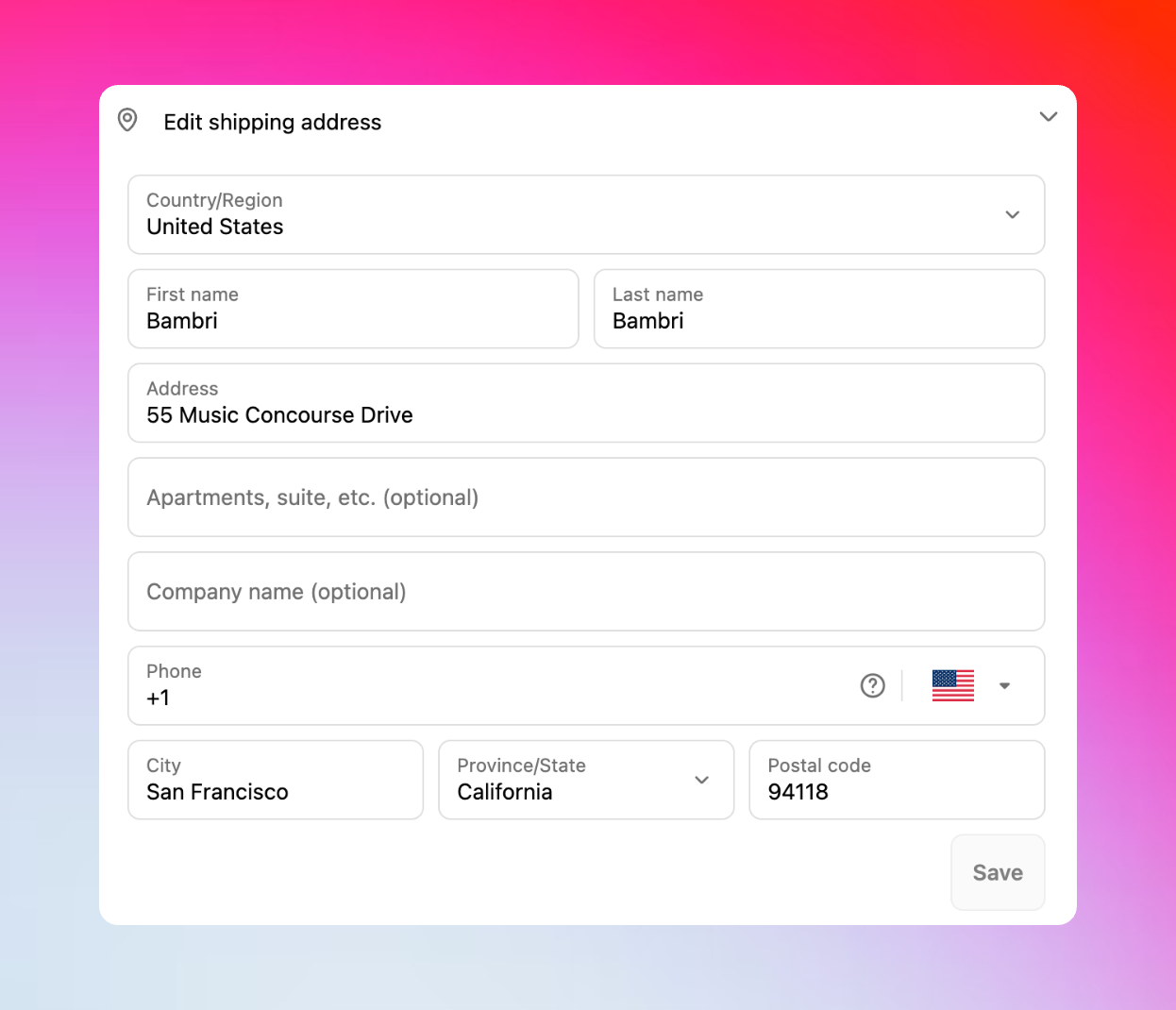
Customer notices a wrong shipping address on the thank you page or Shopify order status page and clicks **Edit shipping address**.
Change street address, apartment number, city, state, ZIP code, or country in the address form.
Revize automatically recalculates taxes and shipping rates based on the new address location.
When the address changes, order totals update instantly to reflect:
* New sales tax rates for the destination
* Updated shipping costs based on distance/zone
* International duties and fees (if applicable)
Customer reviews tax/shipping changes and clicks **Confirm** to apply the address update.
The shipping address updates immediately in Shopify and syncs to your fulfillment system.
 ## Smart automatic recalculations
**Instant tax updates**
When customers change their shipping address, Revize automatically recalculates taxes based on the new location:
* State and local sales tax rates
* Tax-exempt regions and zones
* Digital tax requirements by jurisdiction
**Example:** Customer changes address from Oregon (no sales tax) to California (7.25% sales tax) - order total updates instantly.
**Real-time shipping calculations**
Shipping rates automatically update when address or cart contents change:
* Distance-based shipping zones
* Regional carrier availability
* Express vs standard options by location
* International shipping restrictions
**When recalculations happen**
Revize recalculates taxes and shipping when customers:
* Change shipping address to different state/country
* Add or remove items from their order
* Modify product quantities
* Upgrade or downgrade shipping methods
## Common address editing scenarios
**Most common address mistakes:**
* Misspelled street names from mobile autocomplete
* Wrong house or apartment numbers
* Missing or incorrect ZIP codes
**Before/After example:**
* ❌ `123 Main Stret, Apt A, 90210`
* ✅ `123 Main Street, Apt 2A, 90211`
**What customers frequently add:**
* Apartment, unit, or suite numbers
* Building names or floor numbers
* Gate codes or special delivery instructions
**Before/After example:**
* ❌ `456 Oak Street, Chicago IL`
* ✅ `456 Oak Street, Unit 2B, Chicago IL 60601`
**Common location mix-ups:**
* Home address instead of work address
* Old address from Shopify saved addresses
* Wrong city, state, or ZIP code
**Before/After example:**
* ❌ `Home address: 789 Pine Ave, Chicago IL`
* ✅ `Work address: 321 Oak St, New York NY`
**Life events requiring updates:**
* Recent moves to new addresses
* Seasonal address changes
* Vacation or temporary shipping addresses
* Business relocations
**Before/After example:**
* ❌ `Old apartment: 555 Elm St, Austin TX`
* ✅ `New house: 777 Maple Dr, Dallas TX`
## Advanced address validation (Coming soon)
Smart address validation and error corrections are coming soon to help prevent delivery failures.
## Enhanced customer experience
Clean address form designed for mobile users where 70% of address mistakes happen.
Customers see exactly how the corrected address and updated totals will appear.
Any tax or shipping changes are clearly shown before customer confirms the edit.
Customers can update the shipping address multiple times during the edit window.
## Enable shipping address editing
In the Revize app, click **Order Editing** in the sidebar menu.
In **Customer edit options**, toggle on **Shipping address** and click **Save**.
The shipping address editing option appears in the Customer Portal for all new orders.
Shipping address editing with automatic tax and shipping recalculation is essential for preventing delivery failures. Enable it to reduce support tickets, save shipping costs, and improve customer satisfaction.
## Frequently asked questions
Yes, Revize automatically recalculates taxes and shipping rates when customers change their shipping address. Customers see any price changes before confirming the edit.
Absolutely. Address editing works for international orders with proper validation for each country's postal format and automatic tax/duty recalculation.
Customers see the new shipping rate immediately and must pay any difference before the address change is confirmed. The payment flows through Shopify's secure checkout.
Address changes sync automatically to your fulfillment system when orders are released from hold. Since orders remain on hold during the edit window, your 3PL receives the corrected address without any manual intervention.
## Related features
* [Customer Portal](/features/customer-portal) — where customers access address editing tools
* [Edit Window Settings](/setup/edit-window) — control how long address editing remains available
* [Order Processing](/setup/order-processing) — manage order flow during address changes
* [Fulfillment Sync](/setup/fulfillment-sync) — ensure address updates reach your 3PL system
## Smart automatic recalculations
**Instant tax updates**
When customers change their shipping address, Revize automatically recalculates taxes based on the new location:
* State and local sales tax rates
* Tax-exempt regions and zones
* Digital tax requirements by jurisdiction
**Example:** Customer changes address from Oregon (no sales tax) to California (7.25% sales tax) - order total updates instantly.
**Real-time shipping calculations**
Shipping rates automatically update when address or cart contents change:
* Distance-based shipping zones
* Regional carrier availability
* Express vs standard options by location
* International shipping restrictions
**When recalculations happen**
Revize recalculates taxes and shipping when customers:
* Change shipping address to different state/country
* Add or remove items from their order
* Modify product quantities
* Upgrade or downgrade shipping methods
## Common address editing scenarios
**Most common address mistakes:**
* Misspelled street names from mobile autocomplete
* Wrong house or apartment numbers
* Missing or incorrect ZIP codes
**Before/After example:**
* ❌ `123 Main Stret, Apt A, 90210`
* ✅ `123 Main Street, Apt 2A, 90211`
**What customers frequently add:**
* Apartment, unit, or suite numbers
* Building names or floor numbers
* Gate codes or special delivery instructions
**Before/After example:**
* ❌ `456 Oak Street, Chicago IL`
* ✅ `456 Oak Street, Unit 2B, Chicago IL 60601`
**Common location mix-ups:**
* Home address instead of work address
* Old address from Shopify saved addresses
* Wrong city, state, or ZIP code
**Before/After example:**
* ❌ `Home address: 789 Pine Ave, Chicago IL`
* ✅ `Work address: 321 Oak St, New York NY`
**Life events requiring updates:**
* Recent moves to new addresses
* Seasonal address changes
* Vacation or temporary shipping addresses
* Business relocations
**Before/After example:**
* ❌ `Old apartment: 555 Elm St, Austin TX`
* ✅ `New house: 777 Maple Dr, Dallas TX`
## Advanced address validation (Coming soon)
Smart address validation and error corrections are coming soon to help prevent delivery failures.
## Enhanced customer experience
Clean address form designed for mobile users where 70% of address mistakes happen.
Customers see exactly how the corrected address and updated totals will appear.
Any tax or shipping changes are clearly shown before customer confirms the edit.
Customers can update the shipping address multiple times during the edit window.
## Enable shipping address editing
In the Revize app, click **Order Editing** in the sidebar menu.
In **Customer edit options**, toggle on **Shipping address** and click **Save**.
The shipping address editing option appears in the Customer Portal for all new orders.
Shipping address editing with automatic tax and shipping recalculation is essential for preventing delivery failures. Enable it to reduce support tickets, save shipping costs, and improve customer satisfaction.
## Frequently asked questions
Yes, Revize automatically recalculates taxes and shipping rates when customers change their shipping address. Customers see any price changes before confirming the edit.
Absolutely. Address editing works for international orders with proper validation for each country's postal format and automatic tax/duty recalculation.
Customers see the new shipping rate immediately and must pay any difference before the address change is confirmed. The payment flows through Shopify's secure checkout.
Address changes sync automatically to your fulfillment system when orders are released from hold. Since orders remain on hold during the edit window, your 3PL receives the corrected address without any manual intervention.
## Related features
* [Customer Portal](/features/customer-portal) — where customers access address editing tools
* [Edit Window Settings](/setup/edit-window) — control how long address editing remains available
* [Order Processing](/setup/order-processing) — manage order flow during address changes
* [Fulfillment Sync](/setup/fulfillment-sync) — ensure address updates reach your 3PL system