> ## Documentation Index
> Fetch the complete documentation index at: https://docs.revize.app/llms.txt
> Use this file to discover all available pages before exploring further.
# Analytics
> Track Shopify order editing performance with Revize analytics. Monitor revenue impact, customer behavior, support savings, and ROI from self-service order edits.
See exactly how order editing impacts your business. Revize analytics show revenue generated, support time saved, and customer editing patterns to help you optimize and grow.
## Track your order editing success
See total revenue generated from upsells, product additions, and shipping upgrades through order edits.
Track hours saved by reducing support tickets through self-service order editing.
Understand your return on investment with automatic calculations including app costs and savings.
See which editing features customers use most and optimize accordingly.
## Main analytics overview
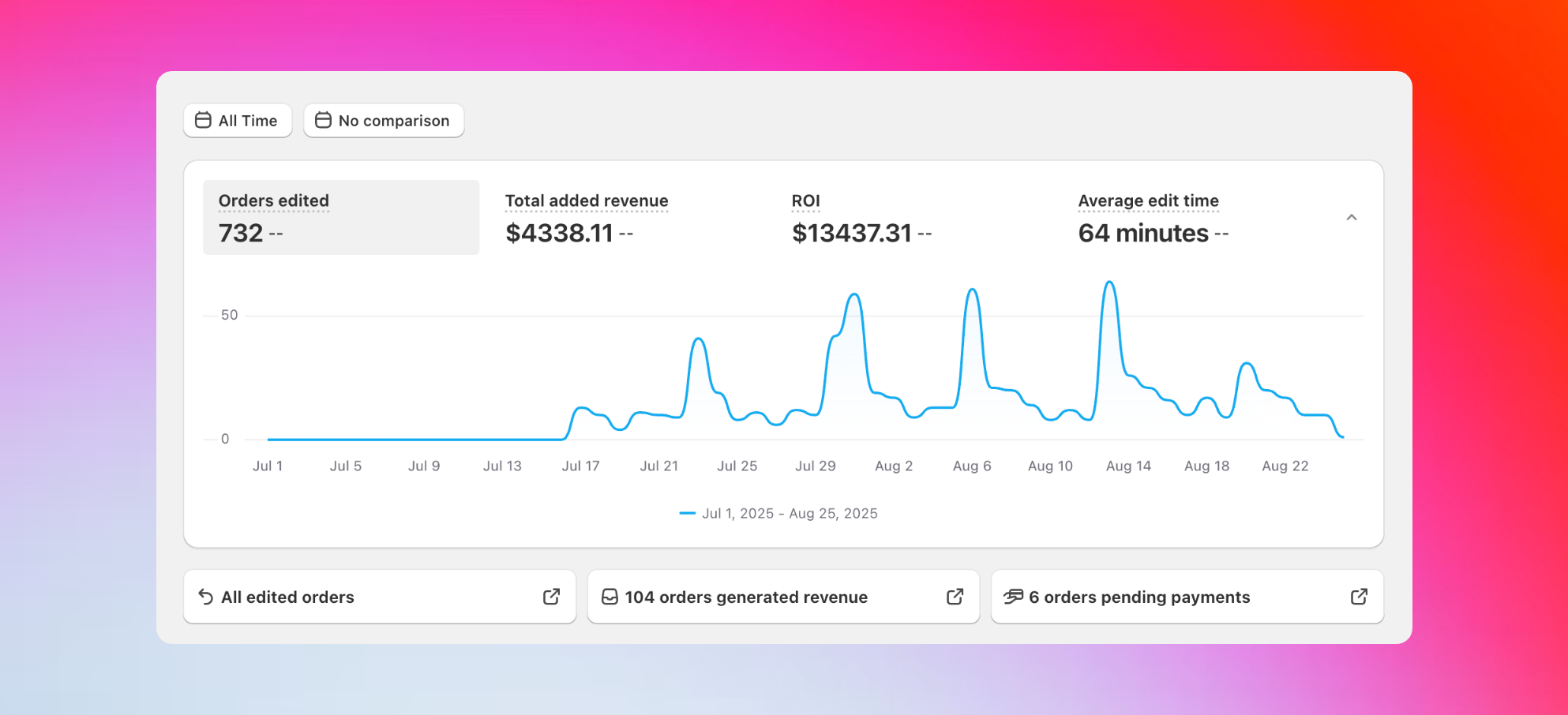 Your main analytics dashboard showing key performance metrics at a glance.
Total number of orders customers have edited using Revize, showing overall feature adoption and customer engagement.
Additional revenue from upsells, upgrades, and product additions during the editing process.
Your complete return on investment from using Revize, calculated automatically.
How quickly customers complete their edits, indicating user experience quality.
**ROI Formula:** (Self-Service Edits × \$10) + (Cancellations Avoided × \$15) + Upsell Revenue - App Fee. The \$10 and \$15 are industry standards based on research showing average support ticket costs and cancellation prevention values.
## Customer editing behavior insights
Your main analytics dashboard showing key performance metrics at a glance.
Total number of orders customers have edited using Revize, showing overall feature adoption and customer engagement.
Additional revenue from upsells, upgrades, and product additions during the editing process.
Your complete return on investment from using Revize, calculated automatically.
How quickly customers complete their edits, indicating user experience quality.
**ROI Formula:** (Self-Service Edits × \$10) + (Cancellations Avoided × \$15) + Upsell Revenue - App Fee. The \$10 and \$15 are industry standards based on research showing average support ticket costs and cancellation prevention values.
## Customer editing behavior insights
 See which editing features customers use most with the edits by type visualization.
**Understanding what customers edit:**
* Shipping address updates
* Product quantity changes
* Adding products to orders
* Email and phone corrections
* Order cancellations
The pie chart shows exactly which editing features customers use most, helping you understand customer needs and focus on improving the most popular features.
**Analytics insight:** If shipping address edits are high, customers are catching delivery mistakes early - saving you failed delivery costs. If product additions are popular, focus on optimizing your upsell flow for even better results.
## Detailed activity breakdown
See which editing features customers use most with the edits by type visualization.
**Understanding what customers edit:**
* Shipping address updates
* Product quantity changes
* Adding products to orders
* Email and phone corrections
* Order cancellations
The pie chart shows exactly which editing features customers use most, helping you understand customer needs and focus on improving the most popular features.
**Analytics insight:** If shipping address edits are high, customers are catching delivery mistakes early - saving you failed delivery costs. If product additions are popular, focus on optimizing your upsell flow for even better results.
## Detailed activity breakdown
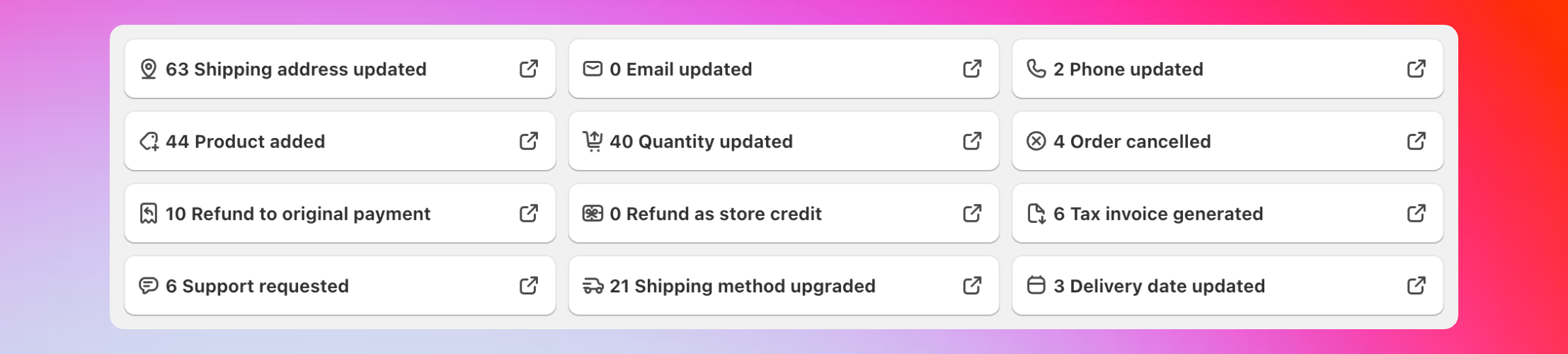 Click any activity type to see specific orders and get detailed insights.
**Track every type of edit:**
* Shipping address updates
* Products added to orders
* Quantity changes
* Email and phone updates
* Shipping method upgrades
* Support requests created
* Orders cancelled
* Refunds processed
* Tax invoices generated
* Delivery dates updated
**Click any number** to see the specific Shopify orders. All orders are automatically tagged based on edit types (upsell, downgrade, and refunds to original payment method or store credit) for easy filtering and analysis.
## Business impact measurements
Click any activity type to see specific orders and get detailed insights.
**Track every type of edit:**
* Shipping address updates
* Products added to orders
* Quantity changes
* Email and phone updates
* Shipping method upgrades
* Support requests created
* Orders cancelled
* Refunds processed
* Tax invoices generated
* Delivery dates updated
**Click any number** to see the specific Shopify orders. All orders are automatically tagged based on edit types (upsell, downgrade, and refunds to original payment method or store credit) for easy filtering and analysis.
## Business impact measurements
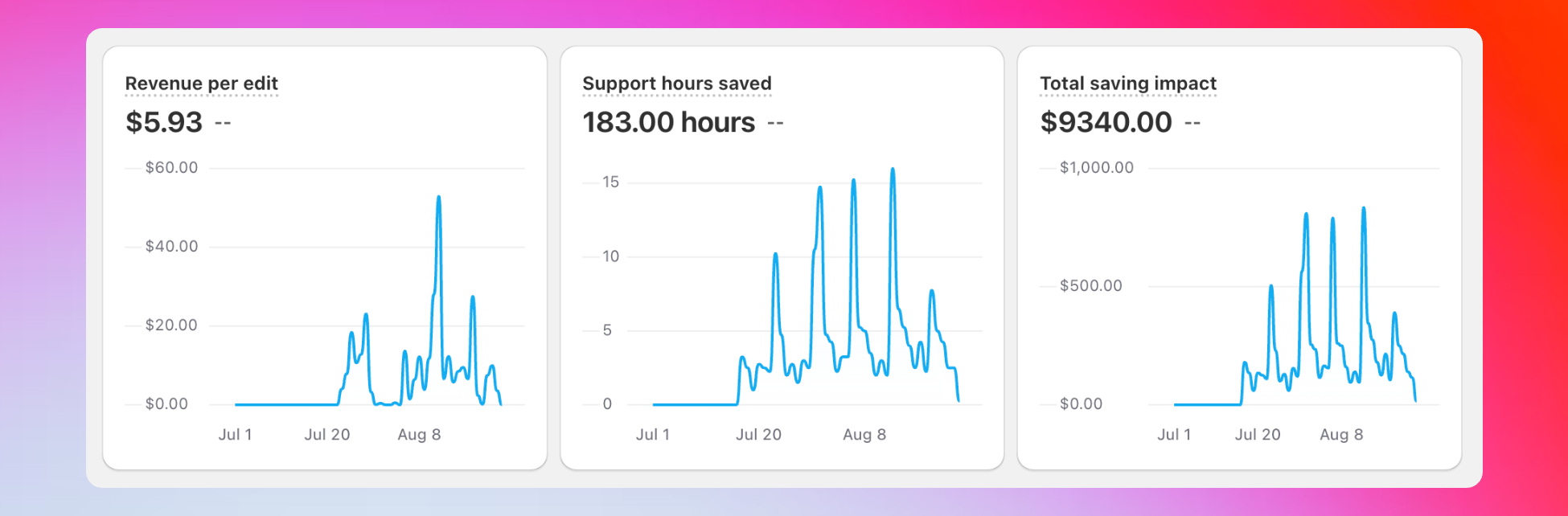 Three key metrics that show your real business results from order editing.
**Three charts that matter most:**
**Revenue per edit**\
Average additional revenue generated per edited order. Shows customers aren't just fixing mistakes - they're adding value to their purchases.
**Support hours saved**\
Time your support team saved because customers edited orders themselves.\
*Calculation: Support Tickets Avoided × 15 minutes*
**Total savings impact**\
Complete cost savings from reduced support work and prevented cancellations.\
*Formula: (Self-Service Edits × \$10) + (Cancellations Avoided × \$15)*
## Order status tracking
Complete list of every order edited through Revize with direct Shopify links for detailed analysis.
Orders that created additional revenue through upsells, upgrades, or additions during editing.
Orders on hold because edits require payment but customers haven't completed payment yet.
Orders cancelled through Revize with cancellation reasons available for trend analysis.
## Cancellation insights
Three key metrics that show your real business results from order editing.
**Three charts that matter most:**
**Revenue per edit**\
Average additional revenue generated per edited order. Shows customers aren't just fixing mistakes - they're adding value to their purchases.
**Support hours saved**\
Time your support team saved because customers edited orders themselves.\
*Calculation: Support Tickets Avoided × 15 minutes*
**Total savings impact**\
Complete cost savings from reduced support work and prevented cancellations.\
*Formula: (Self-Service Edits × \$10) + (Cancellations Avoided × \$15)*
## Order status tracking
Complete list of every order edited through Revize with direct Shopify links for detailed analysis.
Orders that created additional revenue through upsells, upgrades, or additions during editing.
Orders on hold because edits require payment but customers haven't completed payment yet.
Orders cancelled through Revize with cancellation reasons available for trend analysis.
## Cancellation insights
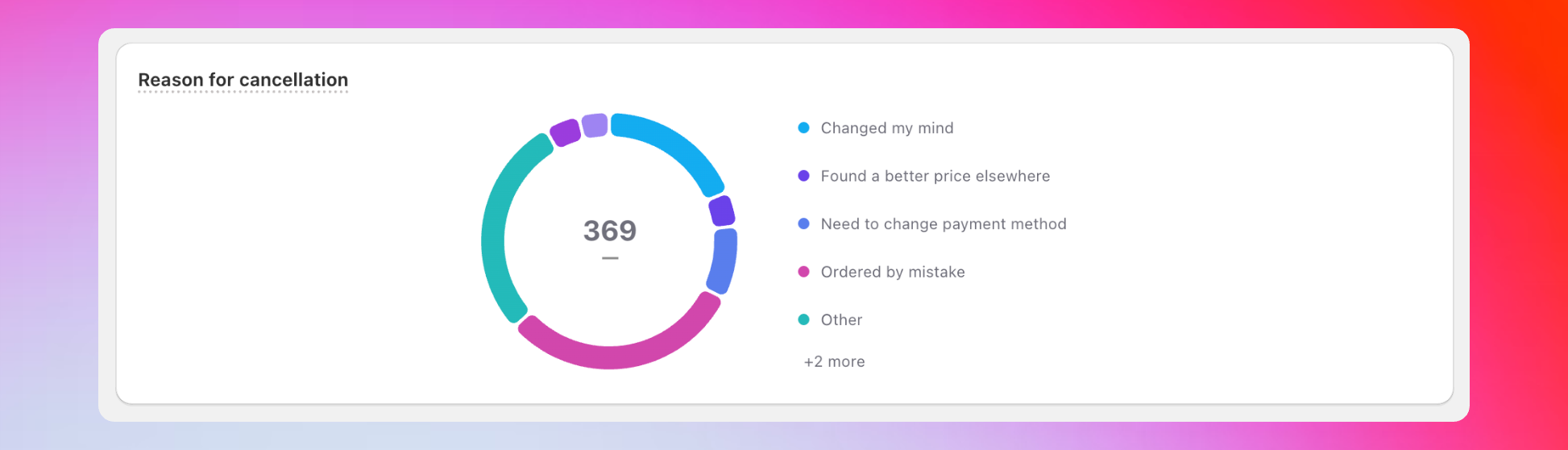 Understand why customers cancel to improve your store and reduce future cancellations.
**Learn from cancellation patterns:**
* "Found a better price elsewhere"
* "Shipping time too long"
* "Ordered by mistake"
* "Changed my mind"
* Custom reasons
Use this data to identify trends and improve your customer experience, pricing strategies, and shipping options.
**Actionable insight:** If "found a better price elsewhere" is common, consider dynamic pricing strategies. If "shipping time too long" appears frequently, explore express shipping options or faster fulfillment partners.
## Coming soon
We're adding more analytics features based on merchant feedback:
* **Top products added** - See which products customers add most during editing
* **Order editing trends** - Seasonal patterns and peak editing times
* **Customer segments** - Identify your most engaged editing customers
* **Mobile vs desktop** - Understand editing preferences by device
Have suggestions for analytics features? Email us at [hello@revize.app](mailto:hello@revize.app) - we build what merchants need most.
## How to access analytics
In your Shopify admin, go to Apps and click on Revize.
Find Analytics in the sidebar to access your complete dashboard.
View overview metrics at the top, then scroll down for detailed breakdowns.
Click any edit type to see specific orders and drill into the data.
## Why analytics help your business
Show stakeholders exactly how order editing pays for itself through revenue and cost savings.
Focus on the editing features customers use most and improve underperforming ones.
Quantify support time savings to justify team resource allocation and planning.
Spot patterns in customer behavior to improve products, policies, and experiences.
## Frequently asked questions
Yes, click any edit type in the dashboard to see the specific Shopify orders. Orders are automatically tagged based on edit types for easy filtering.
These are orders where customers made edits that require additional payment, but haven't completed the payment yet. Revize holds these orders until payment is processed.
Currently, analytics are available through the dashboard. Data export features are planned for future releases based on merchant feedback.
Revize analytics turn your order editing data into actionable business insights. Use these metrics to prove ROI, optimize customer experience, and make data-driven decisions.
## Related features
* [Customer Portal](/features/customer-portal) — where all the editing activity tracked in analytics happens
* [Add Products & Upsell](/features/add-products-upsell) — major contributor to your additional revenue metrics
* [Cancel Order](/features/cancel-order) — see cancellation reasons and trends in your analytics
Understand why customers cancel to improve your store and reduce future cancellations.
**Learn from cancellation patterns:**
* "Found a better price elsewhere"
* "Shipping time too long"
* "Ordered by mistake"
* "Changed my mind"
* Custom reasons
Use this data to identify trends and improve your customer experience, pricing strategies, and shipping options.
**Actionable insight:** If "found a better price elsewhere" is common, consider dynamic pricing strategies. If "shipping time too long" appears frequently, explore express shipping options or faster fulfillment partners.
## Coming soon
We're adding more analytics features based on merchant feedback:
* **Top products added** - See which products customers add most during editing
* **Order editing trends** - Seasonal patterns and peak editing times
* **Customer segments** - Identify your most engaged editing customers
* **Mobile vs desktop** - Understand editing preferences by device
Have suggestions for analytics features? Email us at [hello@revize.app](mailto:hello@revize.app) - we build what merchants need most.
## How to access analytics
In your Shopify admin, go to Apps and click on Revize.
Find Analytics in the sidebar to access your complete dashboard.
View overview metrics at the top, then scroll down for detailed breakdowns.
Click any edit type to see specific orders and drill into the data.
## Why analytics help your business
Show stakeholders exactly how order editing pays for itself through revenue and cost savings.
Focus on the editing features customers use most and improve underperforming ones.
Quantify support time savings to justify team resource allocation and planning.
Spot patterns in customer behavior to improve products, policies, and experiences.
## Frequently asked questions
Yes, click any edit type in the dashboard to see the specific Shopify orders. Orders are automatically tagged based on edit types for easy filtering.
These are orders where customers made edits that require additional payment, but haven't completed the payment yet. Revize holds these orders until payment is processed.
Currently, analytics are available through the dashboard. Data export features are planned for future releases based on merchant feedback.
Revize analytics turn your order editing data into actionable business insights. Use these metrics to prove ROI, optimize customer experience, and make data-driven decisions.
## Related features
* [Customer Portal](/features/customer-portal) — where all the editing activity tracked in analytics happens
* [Add Products & Upsell](/features/add-products-upsell) — major contributor to your additional revenue metrics
* [Cancel Order](/features/cancel-order) — see cancellation reasons and trends in your analytics