> ## Documentation Index
> Fetch the complete documentation index at: https://docs.revize.app/llms.txt
> Use this file to discover all available pages before exploring further.
# Apply Discounts
> Let Shopify customers apply discount codes after checkout. Reduce order cancellations and save support time when customers forget to use promo codes during purchase.
Forgot to add a discount code at checkout? It happens all the time. Instead of cancelling and reordering, customers can now apply their discount directly to their existing order.
## Why post-purchase discounts reduce cancellations
Customers don't need to cancel and reorder just because they forgot a promo code at checkout.
No more "Can you apply my discount code?" emails. Customers handle it themselves in seconds.
Keep the original order intact instead of risking lost sales from abandoned re-orders.
Turn a frustrating "I forgot my code" moment into a seamless self-service fix.
## How customers apply discounts after checkout
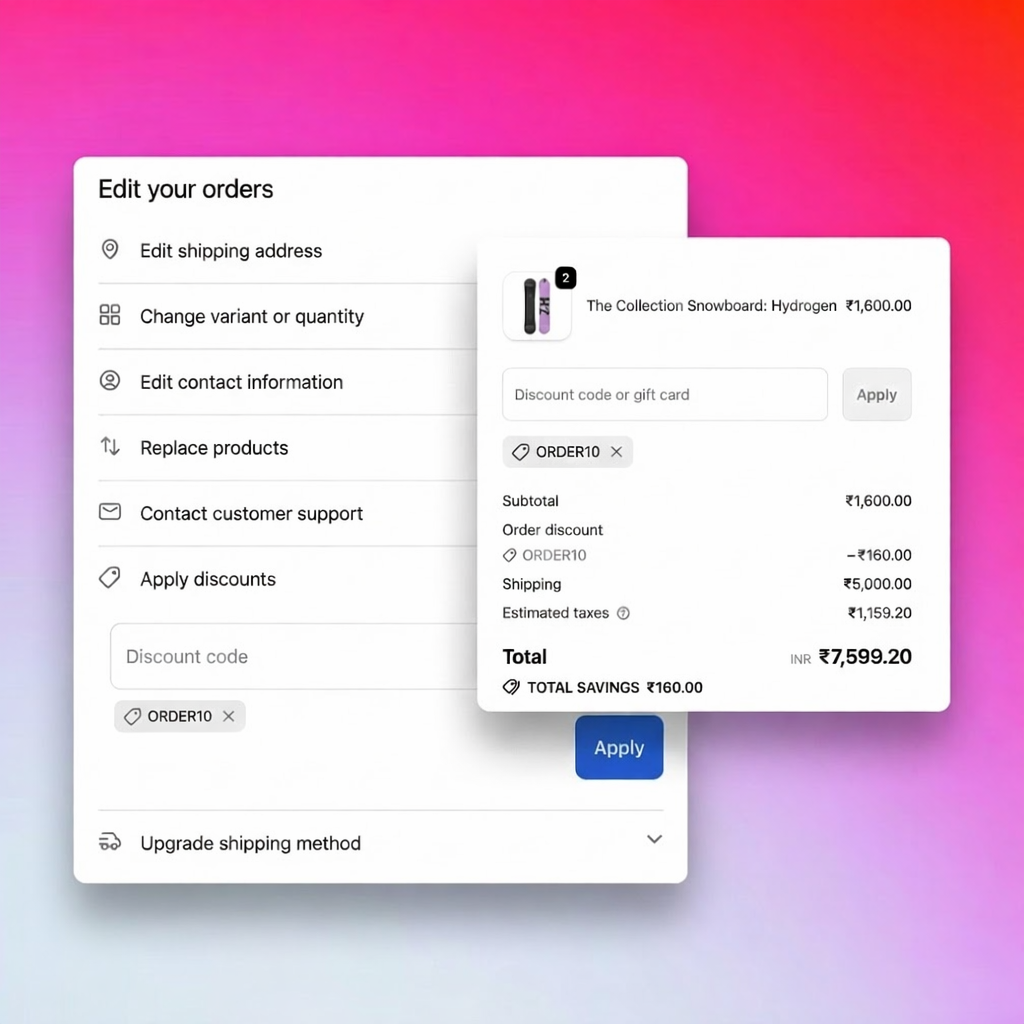
From the order status page or confirmation email, customers click **Edit Order** to open the Revize Customer Portal.
In the discount section, customers enter their promo code and click **Apply**.
The order total recalculates instantly, showing the discount applied and any refund or credit due.
Click **Save changes** to apply the discount. Refunds process automatically based on your settings.
 ## All discount types supported
Revize intelligently handles every type of Shopify discount:
**10%, 20%, 50% off codes**
Percentage discounts are applied to the order total and recalculated instantly. Works with:
* Store-wide percentage codes
* Product-specific percentage discounts
* Collection-based percentage offers
**$10 off, $25 off codes**
Fixed amount discounts reduce the order total by the exact dollar value:
* Flat dollar-off codes
* Minimum purchase threshold codes
* First-time customer discounts
**Buy One Get One, Bundle deals**
Complex promotional logic is fully supported:
* Buy X Get Y free
* Buy 2 Get 1 at 50% off
**Auto-applied promotions**
Shopify automatic discounts are recalculated when orders change:
* Volume discounts (buy more, save more)
* Tiered pricing based on quantity
## Smart eligibility checking
Revize validates discount codes in real-time before applying:
* **Code validity** — Checks if the code exists and hasn't expired
* **Minimum requirements** — Confirms the order meets minimum purchase amounts
* **Product eligibility** — Ensures the discount applies to items in the order
* **Customer eligibility** — Validates customer-specific discount rules
## Dynamic recalculation
When customers modify their order, Revize automatically recalculates everything:
Adding or removing items triggers automatic discount recalculation. If a customer adds products that qualify for an automatic discount, it applies instantly. If they remove items and no longer meet the minimum, the discount adjusts accordingly.
Quantity changes update discount values in real-time. Volume discounts and tiered pricing adjust automatically based on the new cart total.
Address changes may affect shipping-related discounts and taxes. Revize recalculates the entire order to ensure accuracy.
## Refunds when discounts reduce order value
When a discount lowers the order total, customers may be owed a refund:
| Scenario | What Happens |
| --------------------------- | ----------------------------------------------------------- |
| 20% off code applied | Order total decreases, refund issued |
| Products removed + discount | Combined savings calculated, refund processed |
| Discount + shipping upgrade | Net difference calculated (may still owe or receive refund) |
Refunds are processed according to your [payments and refunds settings](/setup/payments-and-refunds)—either to the original payment method or as store credit.
## Enable post-purchase discounts
In the Revize app, navigate to **Order Editing** in the sidebar.
Under **Customer edit options**, toggle on **Apply discount codes** and click **Save**.
In **Payments & Refunds**, choose how discount-related refunds are processed (original payment or store credit).
## Business impact
Stores see significant reduction in "forgot discount code" cancellations after enabling this feature.
Eliminate manual discount application requests from your support queue entirely.
Customers who can fix their own mistakes are more satisfied and likely to return.
Original orders stay intact instead of being cancelled and potentially lost.
## Frequently asked questions
Customers can apply any valid discount code that meets Shopify's eligibility requirements. The code must be active, not expired, within usage limits, and applicable to the products in their order.
Revize recalculates discounts in real-time. If order changes make a discount invalid (e.g., removing products below the minimum), the discount is automatically removed and the customer is notified.
When a discount reduces the order total, refunds are processed according to your payment settings—either back to the original payment method or as store credit. The process is fully automatic.
Yes! Shopify automatic discounts are fully supported. When customers modify their orders, automatic discounts are recalculated based on the new cart contents and totals.
Yes, use [order edit restrictions](/setup/order-edit-restrictions) with order tags to control which orders allow post-purchase discount application.
Post-purchase discount application is one of Revize's most powerful features for reducing cancellations. Enable it to turn "I forgot my code" frustration into instant self-service resolution.
## Related features
* [Add Products & Upsell](/features/add-products-upsell) — let customers add items alongside applying discounts
* [Product Quantity Edits](/features/product-quantity-edits) — let customers modify quantities alongside discounts
* [Cancel Order](/features/cancel-order) — alternative for customers who prefer to reorder
* [Payments & Refunds](/setup/payments-and-refunds) — configure how discount refunds are processed
* [Order Edit Restrictions](/setup/order-edit-restrictions) — control which orders allow discount changes
## All discount types supported
Revize intelligently handles every type of Shopify discount:
**10%, 20%, 50% off codes**
Percentage discounts are applied to the order total and recalculated instantly. Works with:
* Store-wide percentage codes
* Product-specific percentage discounts
* Collection-based percentage offers
**$10 off, $25 off codes**
Fixed amount discounts reduce the order total by the exact dollar value:
* Flat dollar-off codes
* Minimum purchase threshold codes
* First-time customer discounts
**Buy One Get One, Bundle deals**
Complex promotional logic is fully supported:
* Buy X Get Y free
* Buy 2 Get 1 at 50% off
**Auto-applied promotions**
Shopify automatic discounts are recalculated when orders change:
* Volume discounts (buy more, save more)
* Tiered pricing based on quantity
## Smart eligibility checking
Revize validates discount codes in real-time before applying:
* **Code validity** — Checks if the code exists and hasn't expired
* **Minimum requirements** — Confirms the order meets minimum purchase amounts
* **Product eligibility** — Ensures the discount applies to items in the order
* **Customer eligibility** — Validates customer-specific discount rules
## Dynamic recalculation
When customers modify their order, Revize automatically recalculates everything:
Adding or removing items triggers automatic discount recalculation. If a customer adds products that qualify for an automatic discount, it applies instantly. If they remove items and no longer meet the minimum, the discount adjusts accordingly.
Quantity changes update discount values in real-time. Volume discounts and tiered pricing adjust automatically based on the new cart total.
Address changes may affect shipping-related discounts and taxes. Revize recalculates the entire order to ensure accuracy.
## Refunds when discounts reduce order value
When a discount lowers the order total, customers may be owed a refund:
| Scenario | What Happens |
| --------------------------- | ----------------------------------------------------------- |
| 20% off code applied | Order total decreases, refund issued |
| Products removed + discount | Combined savings calculated, refund processed |
| Discount + shipping upgrade | Net difference calculated (may still owe or receive refund) |
Refunds are processed according to your [payments and refunds settings](/setup/payments-and-refunds)—either to the original payment method or as store credit.
## Enable post-purchase discounts
In the Revize app, navigate to **Order Editing** in the sidebar.
Under **Customer edit options**, toggle on **Apply discount codes** and click **Save**.
In **Payments & Refunds**, choose how discount-related refunds are processed (original payment or store credit).
## Business impact
Stores see significant reduction in "forgot discount code" cancellations after enabling this feature.
Eliminate manual discount application requests from your support queue entirely.
Customers who can fix their own mistakes are more satisfied and likely to return.
Original orders stay intact instead of being cancelled and potentially lost.
## Frequently asked questions
Customers can apply any valid discount code that meets Shopify's eligibility requirements. The code must be active, not expired, within usage limits, and applicable to the products in their order.
Revize recalculates discounts in real-time. If order changes make a discount invalid (e.g., removing products below the minimum), the discount is automatically removed and the customer is notified.
When a discount reduces the order total, refunds are processed according to your payment settings—either back to the original payment method or as store credit. The process is fully automatic.
Yes! Shopify automatic discounts are fully supported. When customers modify their orders, automatic discounts are recalculated based on the new cart contents and totals.
Yes, use [order edit restrictions](/setup/order-edit-restrictions) with order tags to control which orders allow post-purchase discount application.
Post-purchase discount application is one of Revize's most powerful features for reducing cancellations. Enable it to turn "I forgot my code" frustration into instant self-service resolution.
## Related features
* [Add Products & Upsell](/features/add-products-upsell) — let customers add items alongside applying discounts
* [Product Quantity Edits](/features/product-quantity-edits) — let customers modify quantities alongside discounts
* [Cancel Order](/features/cancel-order) — alternative for customers who prefer to reorder
* [Payments & Refunds](/setup/payments-and-refunds) — configure how discount refunds are processed
* [Order Edit Restrictions](/setup/order-edit-restrictions) — control which orders allow discount changes