> ## Documentation Index
> Fetch the complete documentation index at: https://docs.revize.app/llms.txt
> Use this file to discover all available pages before exploring further.
# Edit Tax Invoice & Billing Information
> Shopify customers can edit billing address, add company names, and tax IDs on invoices after checkout. Self-service invoice corrections for business customers and tax compliance.
Shopify customers often need to edit billing details or add tax numbers on invoices for business accounting. Let them generate corrected tax invoices themselves without contacting support.
## Why Shopify invoice editing reduces support tickets
Business customers need accurate Shopify invoices with proper company names and tax IDs for accounting compliance.
Shopify customers fix their own invoice details instead of contacting support for billing corrections.
Many businesses need tax registration numbers on Shopify invoices for VAT, GST, and business tax compliance.
Generate clean, accurate tax invoices with proper formatting for corporate accounting systems.
## How Shopify customers edit tax invoices and billing information
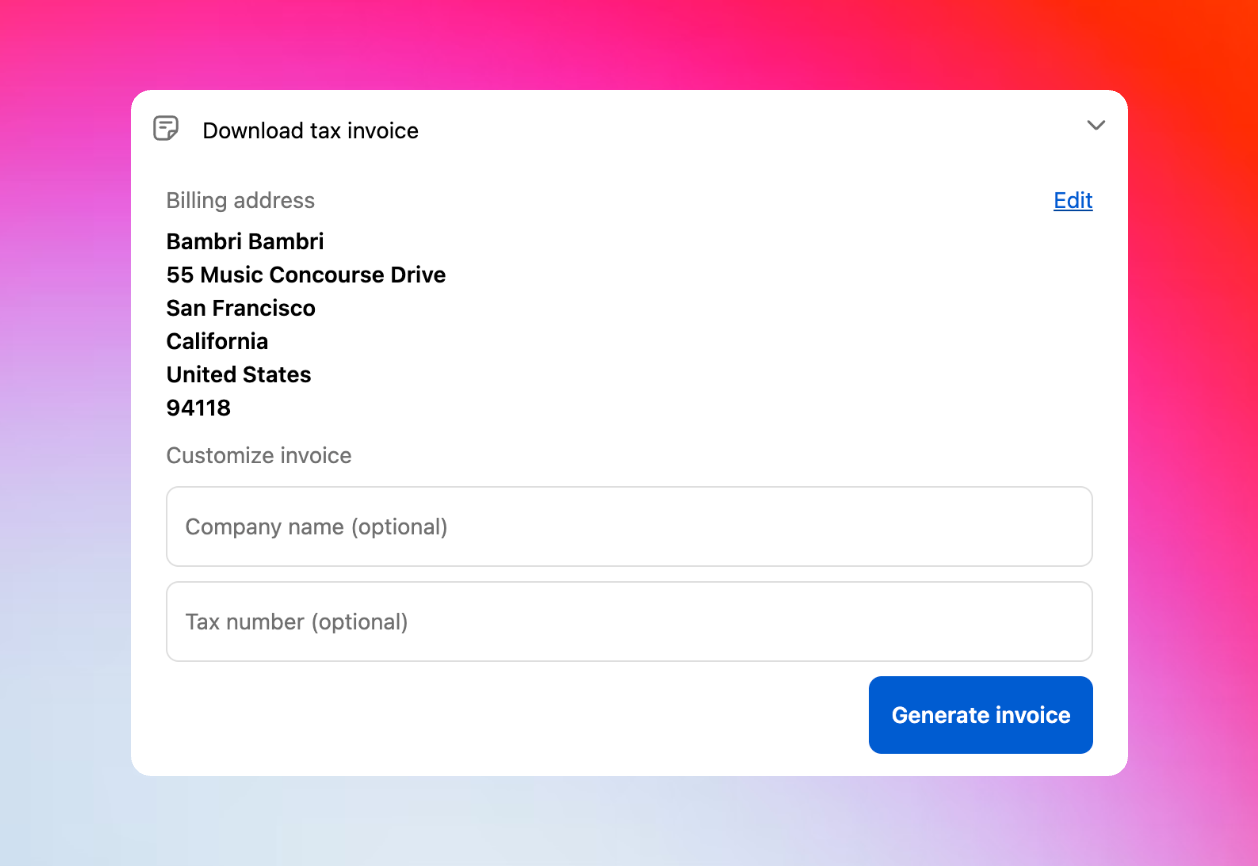
From the Shopify Customer Portal, customers click **Download tax invoice** to access their billing information.
Update any billing address fields - name, street address, city, state, postal code, or phone number on the Shopify invoice.
Enter company name and tax registration number in the "Customize invoice" section for business compliance.
Click **Generate invoice** to create a new PDF tax invoice with the updated billing and business information.
The corrected Shopify tax invoice downloads immediately for business accounting and tax compliance records.
 ## What Shopify customers can edit on tax invoices
**Shopify billing address fields:**
* Customer first name and last name
* Complete street address and apartment/suite details
* City, province/state, and postal code
* Country selection and phone number
**Business tax information for compliance:**
* Company name (optional for business customers)
* Tax registration number (VAT, GST, EIN - optional)
**Important for Shopify users:** Invoice edits only update the tax invoice document. Shopify doesn't allow changing the billing address in the backend after an order is created.
## Extended invoice editing availability for Shopify stores
Enable the optional setting to keep Shopify invoice editing available even after the main edit window closes. Business customers often need tax invoices weeks after purchase for accounting and compliance.
## Enable Shopify invoice and tax editing
In the Revize app, click **Order Editing** in the sidebar.
Toggle on **Edit tax invoice** under Customer edit options and click **Save**.
Toggle on **Allow customers to update their tax invoice after editing deadline** if needed.
## Frequently asked questions
No, Shopify invoice edits only affect the tax invoice document. The original order information in Shopify's backend remains unchanged because Shopify doesn't allow billing address changes after order creation.
Yes, if you enable the extended availability option. This keeps Shopify invoice editing and downloading accessible even when other editing features close.
Shopify tax invoices are generated as professional PDF documents that can be downloaded and saved for business accounting and tax compliance records.
Yes, Shopify customers can generate and download corrected tax invoices multiple times with any billing or business information updates they make.
Shopify invoice editing helps business customers get proper tax documentation while reducing your support workload. Perfect for Shopify B2B stores and tax compliance requirements.
## Related features
* [Customer Portal](/features/customer-portal) — where customers access invoice editing
* [Edit Window Settings](/setup/edit-window) — configure timing and availability
* [Address Edits](/features/address-edits) — separate shipping address management
## What Shopify customers can edit on tax invoices
**Shopify billing address fields:**
* Customer first name and last name
* Complete street address and apartment/suite details
* City, province/state, and postal code
* Country selection and phone number
**Business tax information for compliance:**
* Company name (optional for business customers)
* Tax registration number (VAT, GST, EIN - optional)
**Important for Shopify users:** Invoice edits only update the tax invoice document. Shopify doesn't allow changing the billing address in the backend after an order is created.
## Extended invoice editing availability for Shopify stores
Enable the optional setting to keep Shopify invoice editing available even after the main edit window closes. Business customers often need tax invoices weeks after purchase for accounting and compliance.
## Enable Shopify invoice and tax editing
In the Revize app, click **Order Editing** in the sidebar.
Toggle on **Edit tax invoice** under Customer edit options and click **Save**.
Toggle on **Allow customers to update their tax invoice after editing deadline** if needed.
## Frequently asked questions
No, Shopify invoice edits only affect the tax invoice document. The original order information in Shopify's backend remains unchanged because Shopify doesn't allow billing address changes after order creation.
Yes, if you enable the extended availability option. This keeps Shopify invoice editing and downloading accessible even when other editing features close.
Shopify tax invoices are generated as professional PDF documents that can be downloaded and saved for business accounting and tax compliance records.
Yes, Shopify customers can generate and download corrected tax invoices multiple times with any billing or business information updates they make.
Shopify invoice editing helps business customers get proper tax documentation while reducing your support workload. Perfect for Shopify B2B stores and tax compliance requirements.
## Related features
* [Customer Portal](/features/customer-portal) — where customers access invoice editing
* [Edit Window Settings](/setup/edit-window) — configure timing and availability
* [Address Edits](/features/address-edits) — separate shipping address management