> ## Documentation Index
> Fetch the complete documentation index at: https://docs.revize.app/llms.txt
> Use this file to discover all available pages before exploring further.
# Shipping Upgrade
> Let customers upgrade to faster delivery after checkout. Turn urgency into revenue with express shipping, overnight delivery, and expedited options through automatic payment processing.
Plans change after checkout. When customers suddenly need items faster, let them upgrade shipping instead of canceling their order. Turn urgency into additional revenue.
## Why shipping upgrades drive revenue
Sudden trips, events moved up, or gift deadlines create immediate need for faster delivery.
Instead of canceling to shop elsewhere with faster shipping, customers upgrade their existing order.
Express shipping delivers 60-80% margins compared to 20-30% on standard shipping.
Customers handle rush shipping requests themselves instead of contacting support.
## How customers upgrade shipping
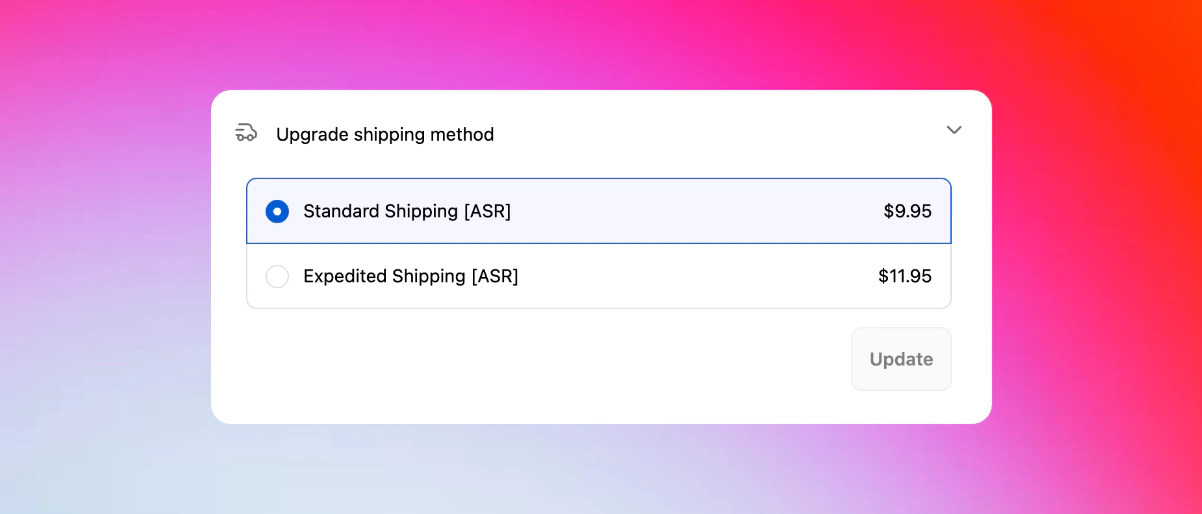
From the Revize Customer Portal, customers click **Upgrade shipping method** to see faster delivery options.
View all available shipping methods with delivery dates, costs, and service descriptions from your store.
Choose from express, overnight, or other expedited options based on your Shopify shipping configuration.
Click **Pay now** to charge the shipping upgrade fee through Shopify's secure checkout system.
Shipping method updates immediately in Shopify and syncs to your fulfillment system with the new service level.
 ## Smart shipping integration
**Seamless integration with popular shipping solutions**
Revize automatically pulls from your configured shipping methods:
* **Shopify Shipping** - built-in carrier rates
* **Advanced Shipping Rules** - complex rate calculations
* **Bespoke Shipping** - custom shipping configurations
* **Carrier-connected rates** - UPS, FedEx, DHL, USPS live rates
* **Third-party shipping apps** - ShipperHQ, Parcelify, Advanced Shipping Manager
Using carrier rates or custom shipping apps? Contact us and we'll configure Revize to work seamlessly with your setup.
**Shipping rates update automatically**
Shipping options and pricing adjust in real-time when customers:
* **Change shipping address** - rates recalculate for new delivery location
* **Add or remove items** - shipping costs adjust for cart weight and size
* **Modify quantities** - carrier rates update for package dimensions
* **Qualify for free shipping** - automatic free shipping when thresholds are met
Customers always see accurate, current shipping options and pricing.
**Configure shipping to match your workflow**
Revize supports different shipping approaches:
* **Combined shipping (default)** - all items ship together with unified rates
* **Split shipping** - items can ship separately with individual rates per package
If your store has split shipping configured, just let us know and we'll enable it in one minute for your store.
**Smart upgrade detection:** When customers add products and their order value exceeds your free shipping threshold, Revize automatically offers free shipping as an upgrade option (if enabled in your store settings).
## Revenue impact
Express shipping upgrades typically increase order value by \$10-50 with minimal additional cost.
Convenient upgrades prevent customers from abandoning orders to shop competitors with faster shipping.
Automated upgrade handling eliminates manual processing of rush shipping requests.
Higher-value shipments strengthen carrier relationships and may unlock volume discounts.
## Enable shipping upgrades
In the Revize app, navigate to **Order Editing** in the sidebar menu.
Under **Customer edit options**, toggle on **Upgrade shipping method** and click **Save**.
Place a test order and verify that shipping upgrade options appear correctly in the Customer Portal.
## Frequently asked questions
Customers click "Upgrade shipping method" in their order portal, compare available faster delivery options, see the exact cost difference, and pay the upgrade fee through Shopify's secure payment system.
Customers can select from any shipping methods configured in your Shopify store, including carrier rates, shipping app configurations, and custom shipping rules you've set up.
Yes, shipping upgrades are location-aware and only display services available to each customer's specific delivery address, including international shipping options and restrictions.
Upgrade fees are charged through Shopify's payment system using the customer's saved payment method. Customers see the exact additional cost before confirming the upgrade.
Absolutely. Revize works with popular shipping apps including Advanced Shipping Rules, Bespoke Shipping, ShipperHQ, Parcelify, and Advanced Shipping Manager. Contact us to ensure proper configuration with your shipping setup.
Yes. Revize fully supports carrier-calculated shipping rates. If you’d like us to help configure them for your setup, just reach out to our team at [hello@revize.app](mailto:hello@revize.app).
It does. Revize can handle split shipping so orders with multiple items can be shipped from different locations when needed. If you’d like this enabled for your store, drop us a line at [hello@revize.app](mailto:hello@revize.app).
Shipping upgrades transform customer urgency into profitable revenue opportunities while providing genuine value. Enable this feature to capture demand for faster delivery and reduce order cancellations.
## Related features
* [Customer Portal](/features/customer-portal) — where customers access shipping upgrade options
* [Edit Window Settings](/setup/edit-window) — ensure upgrade timing aligns with fulfillment schedules
* [Address Edits](/features/address-edits) — shipping rates recalculate automatically with address changes
* [Payments & Refunds](/setup/payments-and-refunds) — configure how upgrade charges are processed
## Smart shipping integration
**Seamless integration with popular shipping solutions**
Revize automatically pulls from your configured shipping methods:
* **Shopify Shipping** - built-in carrier rates
* **Advanced Shipping Rules** - complex rate calculations
* **Bespoke Shipping** - custom shipping configurations
* **Carrier-connected rates** - UPS, FedEx, DHL, USPS live rates
* **Third-party shipping apps** - ShipperHQ, Parcelify, Advanced Shipping Manager
Using carrier rates or custom shipping apps? Contact us and we'll configure Revize to work seamlessly with your setup.
**Shipping rates update automatically**
Shipping options and pricing adjust in real-time when customers:
* **Change shipping address** - rates recalculate for new delivery location
* **Add or remove items** - shipping costs adjust for cart weight and size
* **Modify quantities** - carrier rates update for package dimensions
* **Qualify for free shipping** - automatic free shipping when thresholds are met
Customers always see accurate, current shipping options and pricing.
**Configure shipping to match your workflow**
Revize supports different shipping approaches:
* **Combined shipping (default)** - all items ship together with unified rates
* **Split shipping** - items can ship separately with individual rates per package
If your store has split shipping configured, just let us know and we'll enable it in one minute for your store.
**Smart upgrade detection:** When customers add products and their order value exceeds your free shipping threshold, Revize automatically offers free shipping as an upgrade option (if enabled in your store settings).
## Revenue impact
Express shipping upgrades typically increase order value by \$10-50 with minimal additional cost.
Convenient upgrades prevent customers from abandoning orders to shop competitors with faster shipping.
Automated upgrade handling eliminates manual processing of rush shipping requests.
Higher-value shipments strengthen carrier relationships and may unlock volume discounts.
## Enable shipping upgrades
In the Revize app, navigate to **Order Editing** in the sidebar menu.
Under **Customer edit options**, toggle on **Upgrade shipping method** and click **Save**.
Place a test order and verify that shipping upgrade options appear correctly in the Customer Portal.
## Frequently asked questions
Customers click "Upgrade shipping method" in their order portal, compare available faster delivery options, see the exact cost difference, and pay the upgrade fee through Shopify's secure payment system.
Customers can select from any shipping methods configured in your Shopify store, including carrier rates, shipping app configurations, and custom shipping rules you've set up.
Yes, shipping upgrades are location-aware and only display services available to each customer's specific delivery address, including international shipping options and restrictions.
Upgrade fees are charged through Shopify's payment system using the customer's saved payment method. Customers see the exact additional cost before confirming the upgrade.
Absolutely. Revize works with popular shipping apps including Advanced Shipping Rules, Bespoke Shipping, ShipperHQ, Parcelify, and Advanced Shipping Manager. Contact us to ensure proper configuration with your shipping setup.
Yes. Revize fully supports carrier-calculated shipping rates. If you’d like us to help configure them for your setup, just reach out to our team at [hello@revize.app](mailto:hello@revize.app).
It does. Revize can handle split shipping so orders with multiple items can be shipped from different locations when needed. If you’d like this enabled for your store, drop us a line at [hello@revize.app](mailto:hello@revize.app).
Shipping upgrades transform customer urgency into profitable revenue opportunities while providing genuine value. Enable this feature to capture demand for faster delivery and reduce order cancellations.
## Related features
* [Customer Portal](/features/customer-portal) — where customers access shipping upgrade options
* [Edit Window Settings](/setup/edit-window) — ensure upgrade timing aligns with fulfillment schedules
* [Address Edits](/features/address-edits) — shipping rates recalculate automatically with address changes
* [Payments & Refunds](/setup/payments-and-refunds) — configure how upgrade charges are processed