

See exactly how order editing impacts your business. Revize analytics show revenue generated, support time saved, and customer editing patterns to help you optimize and grow.
Track your order editing success
Revenue Impact
See total revenue generated from upsells, product additions, and shipping upgrades through order edits.
Support Savings
Track hours saved by reducing support tickets through self-service order editing.
Clear ROI
Understand your return on investment with automatic calculations including app costs and savings.
Customer Behavior
See which editing features customers use most and optimize accordingly.
Main analytics overview
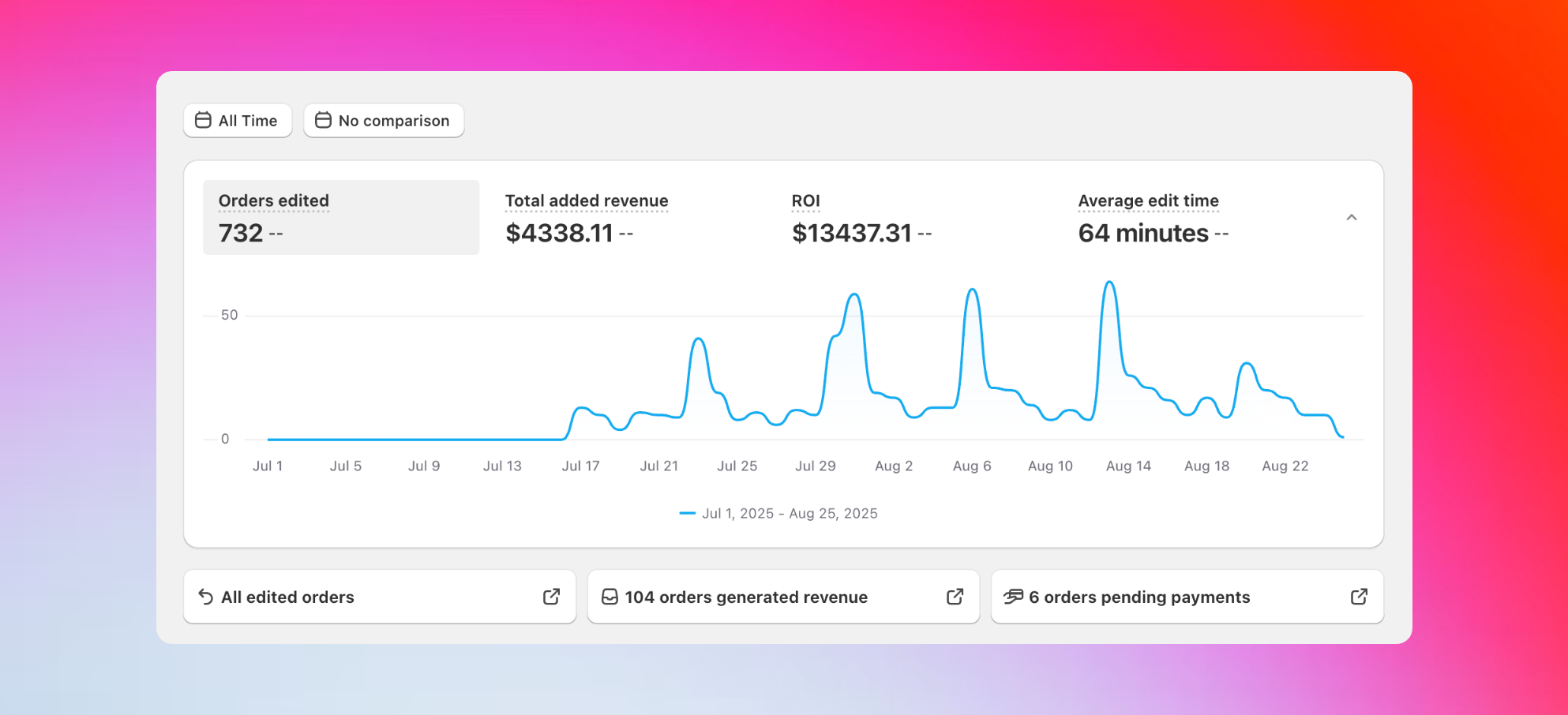
Orders edited
Orders edited
Total number of orders customers have edited using Revize, showing overall feature adoption and customer engagement.
Total added revenue
Total added revenue
Additional revenue from upsells, upgrades, and product additions during the editing process.
ROI
ROI
Your complete return on investment from using Revize, calculated automatically.
Average edit time
Average edit time
How quickly customers complete their edits, indicating user experience quality.
ROI Formula: (Self-Service Edits × $10) + (Cancellations Avoided × $15) + Upsell Revenue - App Fee. The $10 and $15 are industry standards based on research showing average support ticket costs and cancellation prevention values.
Customer editing behavior insights
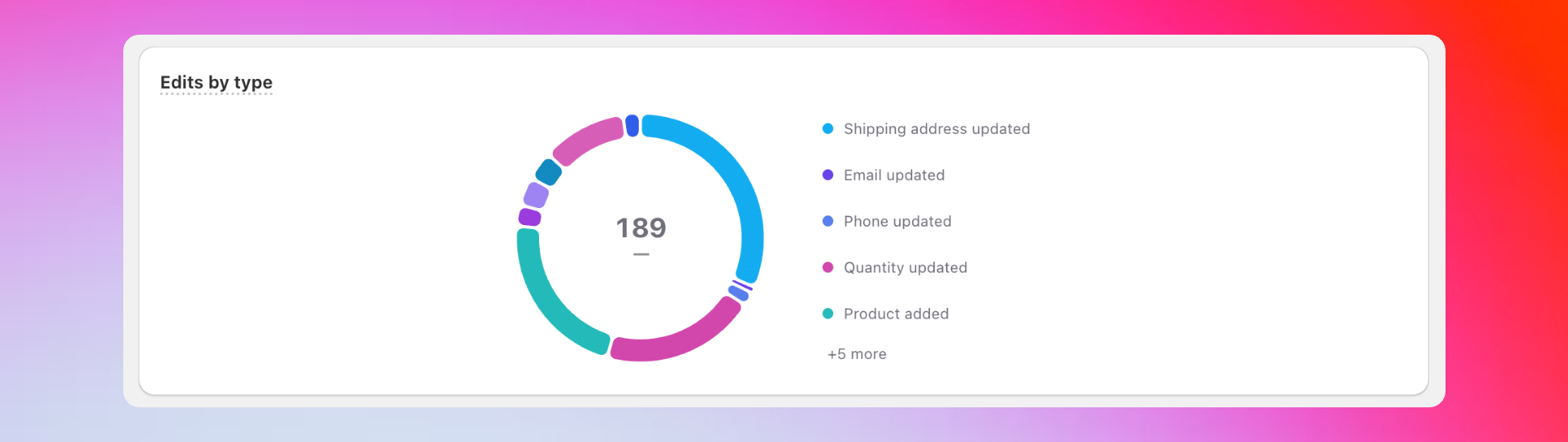
- Shipping address updates
- Product quantity changes
- Adding products to orders
- Email and phone corrections
- Order cancellations
Analytics insight: If shipping address edits are high, customers are catching delivery mistakes early - saving you failed delivery costs. If product additions are popular, focus on optimizing your upsell flow for even better results.
Detailed activity breakdown
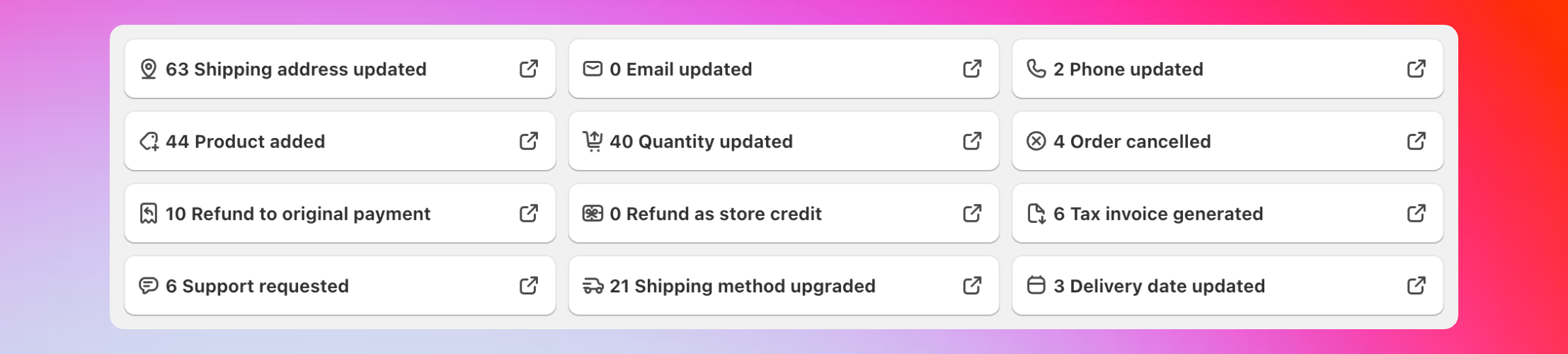
- Shipping address updates
- Products added to orders
- Quantity changes
- Email and phone updates
- Shipping method upgrades
- Support requests created
- Orders cancelled
- Refunds processed
- Tax invoices generated
- Delivery dates updated
Business impact measurements
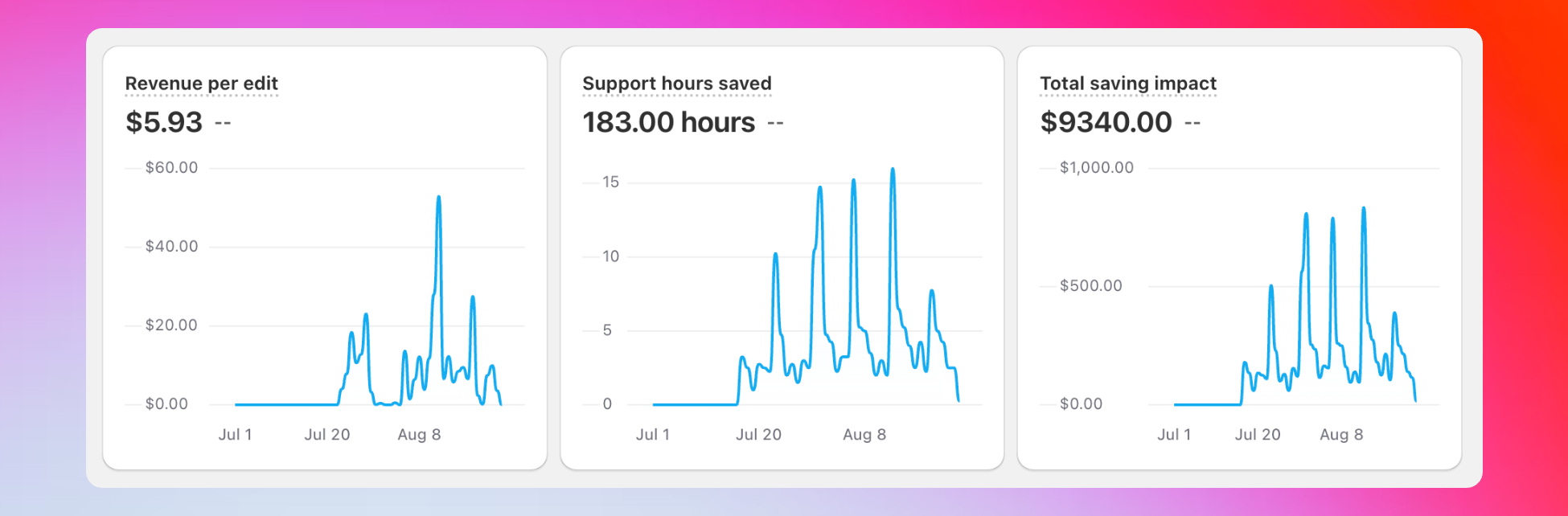
Average additional revenue generated per edited order. Shows customers aren’t just fixing mistakes - they’re adding value to their purchases. Support hours saved
Time your support team saved because customers edited orders themselves.
Calculation: Support Tickets Avoided × 15 minutes Total savings impact
Complete cost savings from reduced support work and prevented cancellations.
Formula: (Self-Service Edits × $10) + (Cancellations Avoided × $15)
Order status tracking
All Edited Orders
Complete list of every order edited through Revize with direct Shopify links for detailed analysis.
Revenue Generated Orders
Orders that created additional revenue through upsells, upgrades, or additions during editing.
Pending Payments
Orders on hold because edits require payment but customers haven’t completed payment yet.
Cancelled Orders
Orders cancelled through Revize with cancellation reasons available for trend analysis.
Cancellation insights
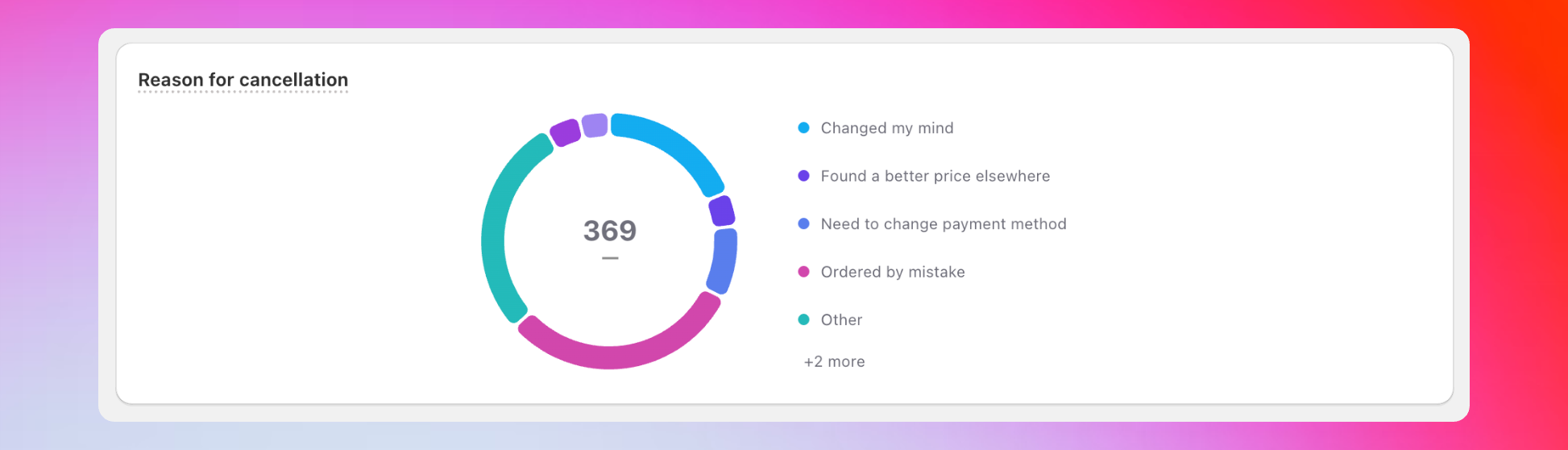
- “Found a better price elsewhere”
- “Shipping time too long”
- “Ordered by mistake”
- “Changed my mind”
- Custom reasons
Coming soon
We’re adding more analytics features based on merchant feedback:- Top products added - See which products customers add most during editing
- Order editing trends - Seasonal patterns and peak editing times
- Customer segments - Identify your most engaged editing customers
- Mobile vs desktop - Understand editing preferences by device
How to access analytics
1
Open Revize app
In your Shopify admin, go to Apps and click on Revize.
2
Click Analytics
Find Analytics in the sidebar to access your complete dashboard.
3
Explore the data
View overview metrics at the top, then scroll down for detailed breakdowns.
4
Click for details
Click any edit type to see specific orders and drill into the data.
Why analytics help your business
Prove ROI
Show stakeholders exactly how order editing pays for itself through revenue and cost savings.
Optimize Features
Focus on the editing features customers use most and improve underperforming ones.
Reduce Support Costs
Quantify support time savings to justify team resource allocation and planning.
Identify Trends
Spot patterns in customer behavior to improve products, policies, and experiences.
Frequently asked questions
Can I see which specific orders were edited?
Can I see which specific orders were edited?
Yes, click any edit type in the dashboard to see the specific Shopify orders. Orders are automatically tagged based on edit types for easy filtering.
What does 'pending payments' mean?
What does 'pending payments' mean?
These are orders where customers made edits that require additional payment, but haven’t completed the payment yet. Revize holds these orders until payment is processed.
Can I export analytics data?
Can I export analytics data?
Currently, analytics are available through the dashboard. Data export features are planned for future releases based on merchant feedback.
Revize analytics turn your order editing data into actionable business insights. Use these metrics to prove ROI, optimize customer experience, and make data-driven decisions.
Related features
- Customer Portal — where all the editing activity tracked in analytics happens
- Add Products — major contributor to your additional revenue metrics
- Cancel Order — see cancellation reasons and trends in your analytics