

Plans change after checkout. When customers suddenly need items faster, let them upgrade shipping instead of canceling their order. Turn urgency into additional revenue.
Why shipping upgrades drive revenue
Capture Last-Minute Urgency
Sudden trips, events moved up, or gift deadlines create immediate need for faster delivery.
Prevent Order Cancellations
Instead of canceling to shop elsewhere with faster shipping, customers upgrade their existing order.
Higher Shipping Margins
Express shipping typically delivers higher margins than standard shipping on standard shipping.
Reduce Support Workload
Customers handle rush shipping requests themselves instead of contacting support.
How customers upgrade shipping
1
Access upgrade options
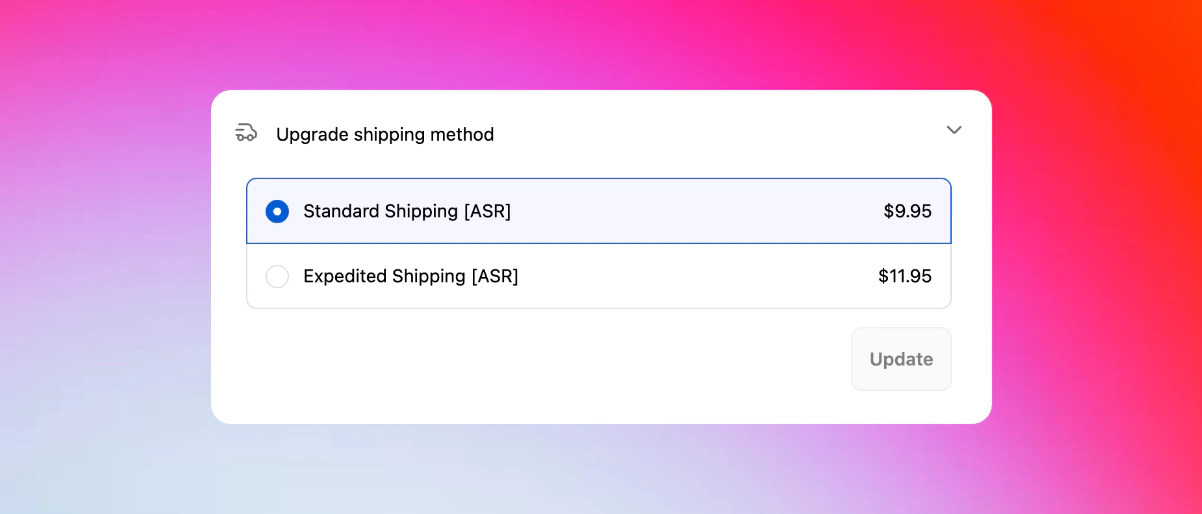
From the Revize Customer Portal, customers click Upgrade shipping method to see faster delivery options.
2
Compare shipping methods
View all available shipping methods with delivery dates, costs, and service descriptions from your store.
3
Select faster delivery
Choose from express, overnight, or other expedited options based on your Shopify shipping configuration.
4
Pay the difference
Click Pay now to charge the shipping upgrade fee through Shopify’s secure checkout system.
5
Instant order update
Shipping method updates immediately in Shopify and syncs to your fulfillment system with the new service level.
Smart shipping integration
Works with your existing shipping setup
Works with your existing shipping setup
Seamless integration with popular shipping solutionsRevize automatically pulls from your configured shipping methods:
- Shopify Shipping - built-in carrier rates
- Advanced Shipping Rules - complex rate calculations
- Bespoke Shipping - custom shipping configurations
- Carrier-connected rates - UPS, FedEx, DHL, USPS live rates
- Third-party shipping apps - ShipperHQ, Parcelify, Advanced Shipping Manager
Using carrier rates or custom shipping apps? Contact us and we’ll configure Revize to work seamlessly with your setup.
Dynamic rate calculations
Dynamic rate calculations
Shipping rates update automaticallyShipping options and pricing adjust in real-time when customers:
- Change shipping address - rates recalculate for new delivery location
- Add or remove items - shipping costs adjust for cart weight and size
- Modify quantities - carrier rates update for package dimensions
- Qualify for free shipping - automatic free shipping when thresholds are met
Flexible fulfillment options
Flexible fulfillment options
Configure shipping to match your workflowRevize supports different shipping approaches:
- Combined shipping (default) - all items ship together with unified rates
- Split shipping - items can ship separately with individual rates per package
Revenue impact
Immediate Revenue Boost
Express shipping upgrades typically increase order value by $10-50 with minimal additional cost.
Customer Retention
Convenient upgrades prevent customers from abandoning orders to shop competitors with faster shipping.
Operational Efficiency
Automated upgrade handling eliminates manual processing of rush shipping requests.
Carrier Benefits
Higher-value shipments strengthen carrier relationships and may unlock volume discounts.
Enable shipping upgrades
1
Open Order Editing settings
In the Revize app, navigate to Order Editing in the sidebar menu.
2
Enable the shipping upgrade feature
Under Customer edit options, toggle on Upgrade shipping method and click Save.
3
Test the experience
Place a test order and verify that shipping upgrade options appear correctly in the Customer Portal.
Frequently asked questions
How do customers upgrade their shipping method in Revize?
How do customers upgrade their shipping method in Revize?
Customers click “Upgrade shipping method” in their order portal, compare available faster delivery options, see the exact cost difference, and pay the upgrade fee through Shopify’s secure payment system.
What shipping methods can customers choose from?
What shipping methods can customers choose from?
Customers can select from any shipping methods configured in your Shopify store, including carrier rates, shipping app configurations, and custom shipping rules you’ve set up.
Do shipping upgrades work for international orders?
Do shipping upgrades work for international orders?
Yes, shipping upgrades are location-aware and only display services available to each customer’s specific delivery address, including international shipping options and restrictions.
How are shipping upgrade payments processed?
How are shipping upgrade payments processed?
Upgrade fees are charged through Shopify’s payment system using the customer’s saved payment method. Customers see the exact additional cost before confirming the upgrade.
Do you integrate with shipping apps like Advanced Shipping Rules?
Do you integrate with shipping apps like Advanced Shipping Rules?
Absolutely. Revize works with popular shipping apps including Advanced Shipping Rules, Bespoke Shipping, ShipperHQ, Parcelify, and Advanced Shipping Manager. Contact us to ensure proper configuration with your shipping setup.
Does Revize work with carrier-calculated rates?
Does Revize work with carrier-calculated rates?
Yes. Revize fully supports carrier-calculated shipping rates. If you’d like us to help configure them for your setup, just reach out to our team at hello@revize.app.
Does Revize support split shipping?
Does Revize support split shipping?
It does. Revize can handle split shipping so orders with multiple items can be shipped from different locations when needed. If you’d like this enabled for your store, drop us a line at hello@revize.app.
Shipping upgrades transform customer urgency into profitable revenue opportunities while providing genuine value. Enable this feature to capture demand for faster delivery and reduce order cancellations.
Related features
- Customer Portal — where customers access shipping upgrade options
- Edit Window Settings — ensure upgrade timing aligns with fulfillment schedules
- Address Edits — shipping rates recalculate automatically with address changes
- Payments & Refunds — configure how upgrade charges are processed