

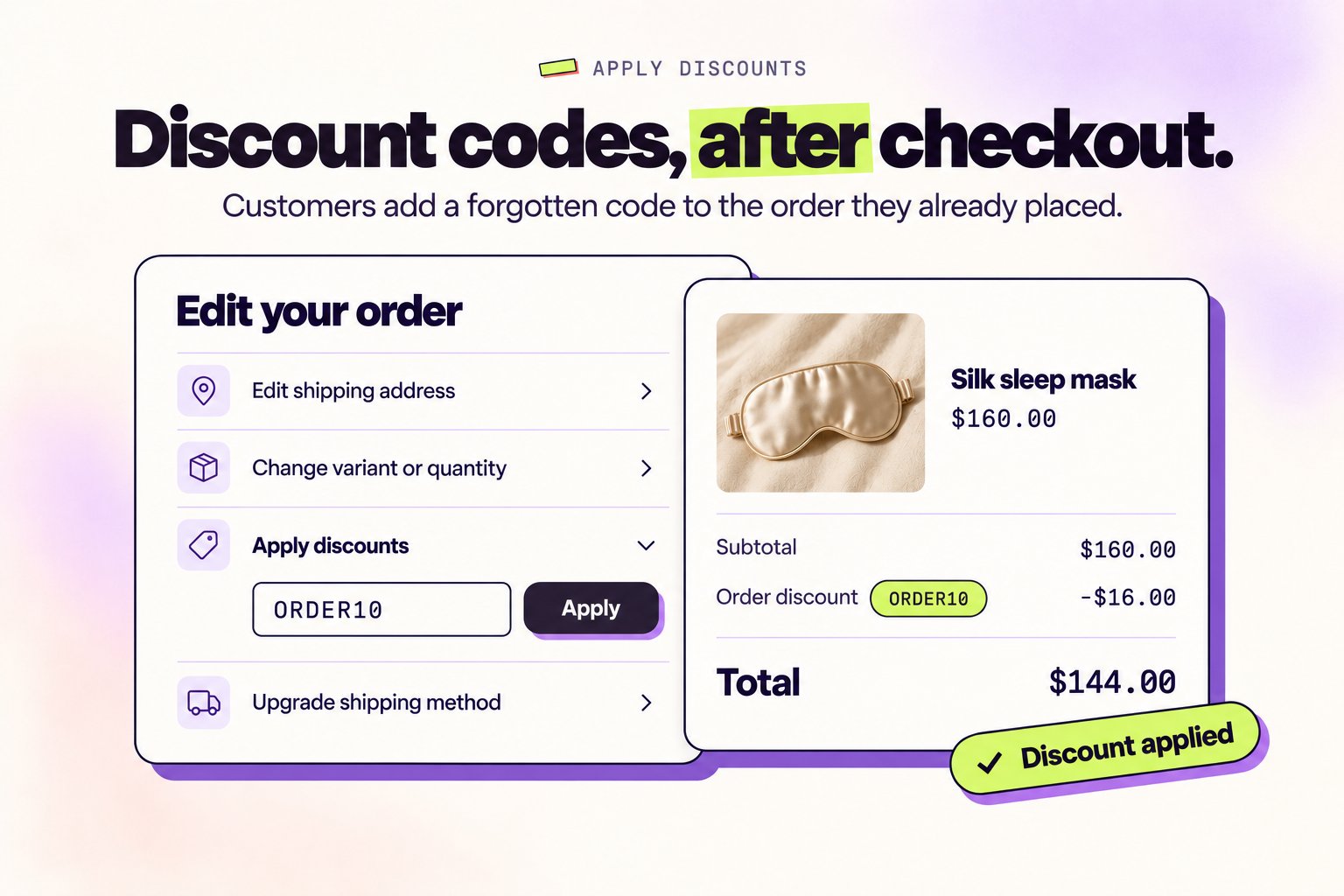
Forgot to add a discount code at checkout? It happens all the time. Instead of cancelling and reordering, customers can now apply their discount directly to their existing order.
Why post-purchase discounts reduce cancellations
Prevent Order Cancellations
Customers don’t need to cancel and reorder just because they forgot a promo code at checkout.
Reduce Support Tickets
No more “Can you apply my discount code?” emails. Customers handle it themselves in seconds.
Protect Your Revenue
Keep the original order intact instead of risking lost sales from abandoned re-orders.
Improve Customer Experience
Turn a frustrating “I forgot my code” moment into a seamless self-service fix.
How customers apply discounts after checkout
1
Access the order editing portal
From the order status page or confirmation email, customers click Edit Order to open the Revize Customer Portal.
2
Enter discount code
In the discount section, customers enter their promo code and click Apply.
3
See updated order total
The order total recalculates instantly, showing the discount applied and any refund or credit due.
4
Confirm changes
Click Save changes to apply the discount. Refunds process automatically based on your settings.
All discount types supported
Revize intelligently handles every type of Shopify discount:- Percentage Discounts
- Fixed Amount
- BOGO & Bundle
- Automatic Discounts
10%, 20%, 50% off codesPercentage discounts are applied to the order total and recalculated instantly. Works with:
- Store-wide percentage codes
- Product-specific percentage discounts
- Collection-based percentage offers
Smart eligibility checking
Revize validates discount codes in real-time before applying:- Code validity — Checks if the code exists and hasn’t expired
- Minimum requirements — Confirms the order meets minimum purchase amounts
- Product eligibility — Ensures the discount applies to items in the order
- Customer eligibility — Validates customer-specific discount rules
Dynamic recalculation
When customers modify their order, Revize automatically recalculates everything:Add or remove products
Add or remove products
Adding or removing items triggers automatic discount recalculation. If a customer adds products that qualify for an automatic discount, it applies instantly. If they remove items and no longer meet the minimum, the discount adjusts accordingly.
Change quantities
Change quantities
Quantity changes update discount values in real-time. Volume discounts and tiered pricing adjust automatically based on the new cart total.
Update shipping address
Update shipping address
Address changes may affect shipping-related discounts and taxes. Revize recalculates the entire order to ensure accuracy.
Refunds when discounts reduce order value
When a discount lowers the order total, customers may be owed a refund:Refunds are processed according to your payments and refunds settings—either to the original payment method or as store credit.
Enable post-purchase discounts
1
Open Order Editing settings
In the Revize app, navigate to Order Editing in the sidebar.
2
Enable discount application
Go to Order Editing → Customer edits, turn on Apply discounts, and click Save.
3
Configure refund method
On the Editing policy tab, under Refunds, choose how discount-related refunds are processed: Original payment method or Store credit. Apply discounts is unavailable while Refunds is set to No refunds.
Business impact
Fewer Cancellations
Stores see significant reduction in “forgot discount code” cancellations after enabling this feature.
Lower Support Volume
Eliminate manual discount application requests from your support queue entirely.
Higher Retention
Customers who can fix their own mistakes are more satisfied and likely to return.
Protected AOV
Original orders stay intact instead of being cancelled and potentially lost.
Frequently asked questions
Can customers apply any discount code after checkout?
Can customers apply any discount code after checkout?
Customers can apply any valid discount code that meets Shopify’s eligibility requirements. The code must be active, not expired, within usage limits, and applicable to the products in their order.
What happens if a customer adds products and a discount no longer applies?
What happens if a customer adds products and a discount no longer applies?
Revize recalculates discounts in real-time. If order changes make a discount invalid (e.g., removing products below the minimum), the discount is automatically removed and the customer is notified.
How are refunds processed when discounts are applied?
How are refunds processed when discounts are applied?
When a discount reduces the order total, refunds are processed according to your payment settings—either back to the original payment method or as store credit. The process is fully automatic.
Do automatic discounts work with post-purchase editing?
Do automatic discounts work with post-purchase editing?
Yes! Shopify automatic discounts are fully supported. When customers modify their orders, automatic discounts are recalculated based on the new cart contents and totals.
Can I restrict which orders allow discount application?
Can I restrict which orders allow discount application?
Yes, use order edit restrictions with order tags to control which orders allow post-purchase discount application.
Post-purchase discount application is one of Revize’s most powerful features for reducing cancellations. Enable it to turn “I forgot my code” frustration into instant self-service resolution.
Related features
- Add Products — let customers add items alongside applying discounts
- Product Quantity Edits — let customers modify quantities alongside discounts
- Cancel Order — alternative for customers who prefer to reorder
- Payments & Refunds — configure how discount refunds are processed
- Order Edit Restrictions — control which orders allow discount changes